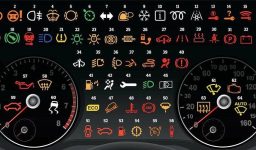
Volkswagen Golf Warning Lights: What They Signify and the Ultimate Guide for Golf 7 and Beyond
Even the legendary Volkswagen Golf (especially its Golf 7 version) can have its moments. Your dashboard may suddenly illuminate with light.
Be calm! These little icons aren’t there to ruin your day; they’re simply your car telling you something’s amiss, urging you to come check me before it worsens.
This guide will explain what each Golf warning light means, as well as providing tips for maintaining it properly.
Table of Contents
Volkswagen Golf Warning Lights
1. Engine Warning Light (Check Engine).

Engine light. This indicates that your ECU (the brain of your car) has identified something is amiss with your engine – possibly spark plugs, sensors, or fuel cap issues – making the check immediately, as small problems can quickly snowball into larger ones.
2. ABS Warning Light

Be proactive and have your ABS checked at every coffee stop to ensure safe travels!
3. Tire Pressure Warning Light

Tip of the Week from The Mechanics: Check Tire Pressure While Cold
4. Airbag Warning Light

It should never be taken lightly when the Airbag Warning Light illuminates, signaling something is amiss with either your airbag system or seatbelt – safety over convenience!
Different Golf models feature unique qualities – Here is what differs.
Golf 6
This car has more traditional styling. Most of its warning lights — oil, engine and ABS lights — are classics; there are fewer electronic glitches but more frequent mechanical problems (such as exhaust or EGR Valve issues).
Golf 7
Its technology features include digital dashboards and electronic handbrakes galore. That means more sensors will likely trigger warning lights – this may just be part of its electronic mind games!
Golf 8
This futuristic spaceship will keep everyone happy in your family. Be wary of high-tech alerts with systems like adaptive cruise control and lane assist; don’t take them as signs that something’s wrong; rather it could just be talking! The car won’t die simply by flashing warning lights; rather it may simply be communicating its intentions.
What do the light colors mean?
- Red: Stop. Seriously. Now pull over and get it over with.
- Yellow: Urgent but not urgent. Imagine this is your golf saying “Fix Me Soon, Bud.”
- Green: All is well! These lights serve simply as status indicators, similar to headlights and cruise control systems.
Common warning lights you’ll come across (and my take on them)
- Oil pressure light: If your engine’s oil light illuminates, that could mean low levels are being detected within it – act quickly before this becomes an issue! Check your engine quickly.
- Charger/Battery Light: This indicator light will light up if either your battery or alternator are malfunctioning and needs servicing. Drive straight to a mechanic (or me!).
- EPS (Electric Power Steering) Light: Your steering may feel heavy — like arm-day-at-the-gym heavy — and its electric assist may have failed completely.
- Coolant Temperature Light: If this light turns red, that indicates your engine has become hotter than an outdoor barbecue and needs cooling down before continuing its work. Allow time for this process.
- Fuel Low: Easy – your tank is getting low. Do not take the risk unless you enjoy pushing your vehicle back to a station yourself.
- Seat Belt Light: Secure it before playing golf; don’t listen to anyone who tells you otherwise! It is your golf, not theirs.
Common Volkswagen Golf Issues
1. Transmission issues related to DSG gearbox
When things work smoothly, they’re enjoyable – but when they don’t it can become an administrative nightmare. Common issues include:
Poor shift quality, delayed response times and failure to complete tasks in time are among the symptoms of transmission failure.
Tip from a mechanic: Regular oil changes and software updates will keep your DSG in top form, helping prevent costly repair bills if ignored.
2. Troubles With Your TDI Engine
TDI engines can be great vehicles — until their EGR Valve or Turbo becomes blocked up!
EGR becomes fouled due to carbon accumulation. ( If you wondering how to maintenence and clean your Golf’s EGR you can read this answer : https://ask4auto.com/egr-maintenance-for-golf/#comment-78 )
An engine with high mileage suffers a turbo failure after only short distance travel.
DPF does not prefer frequent city trips (it doesn’t get hot enough to clean itself automatically).
Driving Your Golf on the Highway
To help clear away soot from your engine, drive on highway periodically – this should help.
3. Electrical Gremlins
A battery test or software update could solve most electrical issues; rather than hunting ghosts without first checking the basics.
4. Suspension & Steering optimisation
Squeaks, clunks and your Golf seeming to bounce over bumps may indicate worn bushings or shocks – these components tend to wear out over time so it’s wise to replace both pairs to restore performance as soon as possible.
5. Oil Consumption
Tip from a mechanic: For optimal engine wear prevention, check oil every 1000 km and keep topped up to keep engine wear at bay – this will save a lot of hassle in the future.
6. Climate Control Problems
A tip from your mechanic: It is wise not to wait until summer before using your A/C unit; run it now and again throughout winter in order to maintain healthy seals.
7. Rust and Paint Issues
To address rust and paint issues on a regular basis, clean regularly, wax twice annually, fix any chips as soon as they appear, and take steps against water leakage issues promptly.
8. Water Leaks
Tip from a mechanic: In most cases, this problem can be remedied with rubber treatment or seal replacement.
How To Reset Service Reminder on Volkswagen Golf
Have you recently changed the oil in your vehicle? Resetting the “Service Inspection” warning can be done easily by yourself.
Hold down the “00/Set” on your dashboard.
Do not attempt to start the engine; instead, turn the ignition key “On”.
“How Can I Reset Oil Changing Interval?”
Release and press it back once more to complete this cycle.
Undoubtedly! No laptop needed! Congratulations – you have successfully reset the service reminder on your Golf.
Do not panic if your dashboard lights up; take the necessary steps early on to understand what each of its symbols represents and act accordingly, saving both time and money while potentially sparing yourself some swear words along the way.
Your Volkswagen Golf is more than a vehicle; it is your trusted companion, taking you where ever your journey leads without lighting up Times Square with exhaust fumes.